Color
Description
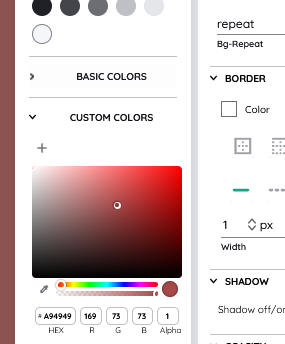
The color property can simply be understood as three pairs of 2-digit hexadecimal numbers. A fourth pair can be added for the so called alpha value which represents the opacity of the color. This type of property is mostly used for setting colors of elements, like background colors or font colors. Alternatively the color property can also be set to the value transparent.
| Feature | Value |
|---|---|
| Theme injectable | ✓ |
| Possible Inputs | #000000 - #FFFFFF or #00000000 - #FFFFFFFF or transparent |
Color ingredients
hex8
This is the actual value of the color you choose, in hex format. This means for example, the color white could look like this: #FFFFFF or like this #FFFFFFFF.
For further information about how to use hex strings, visit https://css-tricks.com/8-digit-hex-codes/.
Occurrences
Toolbar
In the Toolbar the color property can be selected with the Toolbar ExtensionColor Picker. Here only predefined colors can be chosen.
Detail Panel
Inside the Detail Panel the color property will be selected via the Detail Panel Color Picker. Here, you will either choose from predefined colors or a custom color with a special picker.